
CARS API Quick Start Guide
This guide covers the basics of the CARS REST API, from viewing the API documentation in Swagger to working with OData. It also describes two common scenarios: retrieving alarms and requesting log data.
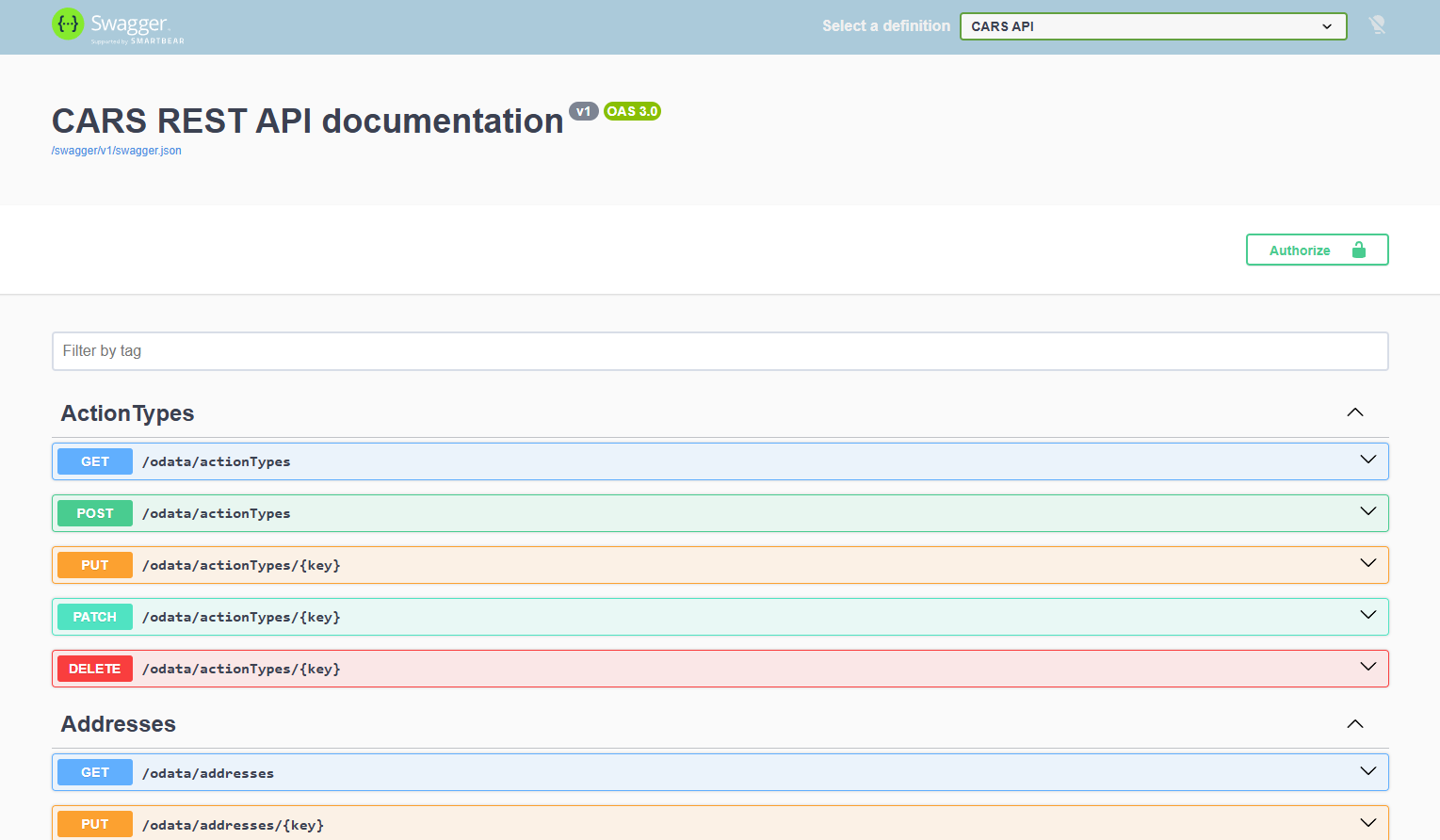
Swagger and PostmanAll object types and routes can be viewed in Swagger. Go to https://cars-api.carsonline.eu/ in the browser to see the overview. For testing the API, the platform Postman is recommended. |
Swagger overview of the CARS REST API |
API authentication
The API requires authentication for most endpoints. Service Credentials should be provided or generated in CARS.
The API uses Bearer authentication: include the token in the Authorization header of every request:
|
Authorization: Bearer {token} |
See API Authentication with Service Credentials for more information on creating and using Service Credentials.
Working with OData
Many endpoints use OData — these are the endpoints containing /odata/. With OData you can filter, sort and limit the results of a request.
More information about OData can be found at odata.org/getting-started.
Default routes
Six default routes are available for every OData controller: a list can be retrieved, a single item can be retrieved, an item can be created, an item can be fully replaced, an item can be partially modified, and an item can be deleted. {type} should be replaced with the object type (for example installations) and {Id} with the Id of the item.
|
Method |
Route |
Description |
|
GET |
/odata/{type} |
Retrieves list of items |
|
GET |
/odata/{type}/{Id} |
Retrieves single item |
|
POST |
/odata/{type} |
Creates item; the body contains the full object |
|
PUT |
/odata/{type}/{Id} |
Replaces item; the body contains the full object |
|
PATCH |
/odata/{type}/{Id} |
Partially modifies item; the body contains only the properties to modify |
|
DELETE |
/odata/{type}/{Id} |
Deletes item |
Query options
Query options are added to a GET request on a list route. Several options can be combined with &, for example /odata/alarms?$filter=Status eq 'Active'&$top=50.
|
Option |
Description |
Example |
|
$select |
Returns only the specified properties, to keep the response small |
/odata/alarms?$select=Status,NotificationDate |
|
$expand |
Includes related entities in the response |
/odata/installations?$expand=InstallationType |
|
$filter |
Returns only the items that match a condition |
/odata/alarms?$filter=Status eq 'Active' |
|
$orderby |
Sorts the results by one or more properties; add desc for descending order |
/odata/alarms?$orderby=NotificationDate desc |
|
$top |
Returns at most the given number of items |
/odata/alarms?$top=50 |
Common use scenarios
Getting alarms
The table below shows how to retrieve common alarm overviews.
|
The 50 most recent alarms |
GET /odata/alarms?$orderby=NotificationDate desc&$top=50 |
|
Only active alarms |
GET /odata/alarms?$filter=Status eq 'Active' |
|
Alarms for one specific installation |
GET /odata/alarms?$filter=InstallationId eq {installationId} Example GET /odata/alarms?$filter=InstallationId eq 00000000-0000-0000-0000-000000000001 |
Getting log data
To request log data, first find the installation, then the variables available for it.
Step 1: Find the installation. Note its Id (the installationId in step 3) and its InstallationTypeId.
|
GET /odata/installations |
Step 2: Find the variables available for that installation type. These are the variables you can request in step 3.
|
GET /odata/variables?$filter=InstallationTypeId eq {installationTypeId} |
Example:
|
GET /odata/variables?$filter=InstallationTypeId eq 00000000-0000-0000-0000-000000000001 |
Step 3: Request the log data.
- For one installation:
|
POST /api/normalizedLogData/v2/{installationId}?startDate={startDateTime}&endDate={endDateTime} Content-Type: application/json [ "Variable1", "Variable2" ] |
Optionally, add &amountOfEntries={amountOfEntries} to the query to limit the number of entries returned.
Example:
|
POST /api/normalizedLogData/v2/00000000-0000-0000-0000-000000000001?startDate=2026-01-01T00:00:00Z&endDate=2026-07-01T00:00:00Z Content-Type: application/json [ "Distance", "Pressure" ] |
- For multiple installations at once:
|
POST /api/normalizedLogData/v2 Content-Type: application/json { "startDateTime": "{startDateTime}", "endDateTime": "{endDateTime}", "amountOfEntries": 1000, "installationRequest": [ { "installationId": "{installationId}", "variables": [ "Variable1" ] }, { "installationId": "{installationId2}", "variables": [ "Variable2" ] } ] } |
Example:
|
POST /api/normalizedLogData/v2 Content-Type: application/json { "startDateTime": "2026-01-01T00:00:00Z", "endDateTime": "2026-07-01T00:00:00Z", "amountOfEntries": 1000, "installationRequest": [ { "installationId": "00000000-0000-0000-0000-000000000001", "variables": [ "Distance" ] }, { "installationId": "00000000-0000-0000-0000-000000000002", "variables": [ "Pressure" ] } ] } |
API Authentication with Service Credentials